Coffee heat rising

Disable Lion’s ANNOYING Automatic Spelling Correction

This morning I sent an e-mail to LaMaya describing how a mutual friend charmingly and amusingly pronounced the word “chiropractor” as “choiropractor.” I thought it was very cute. When she replied to that e-mail, preserving my message in it, I discovered that MacMail and silently corrected the funny spelling back to “chiropractor”: she pronounced “chiropractor” as “chiropractor”! This moment of stupidity, it develops, is a function of Lion OSX, and I am not the first scribbler to find it exceptionally annoying.

A couple of days ago I searched around in “Preferences” trying to find a way to shut MacMail’s arrogant “corrections” OFF. No luck. But today I discovered how to get rid of it, at least in the Mail program.

Open a new message in MacMail.
Place your cursor in the body of the message (not in an address line).
Go to the Edit menu.
Find Spelling and Grammar; hover to open the drop-down menu  next to it.
Click to deselect “Check Spelling Automatically.” Be sure the checkmark next to it disappears.
If you want to be alerted when the system thinks you’re misspelled a word (in time-honored way of MS Word’s little squiggly line under the offending term), stay in this drop-down menu, hover over “Check Spelling” to bring up a sub-dropdown-menu, and select “While Typing.”

Now close out of MacMail and then reboot. This will preserve your changes.

Back later with posts on livelier topics. For the nonce, though, I’m reduced to actually working.

Update on the Nest

Hm. I see I forgot to report on what happened with the Nest thermostat.

After M’hijito’s installation caused it to blow icy air when set at 70 degrees, I checked at the Nest website and found a list of technicians certified to work on the gadget. Thence to Angie’s List, to check the credentials of the three outfits closest to my house. All of them had “A” ratings, suggesting the Nest people are screening applicants for their technician training. I hired the outfit that had the most reviews, upping the probability that a fair number of the “A” ratings were written by real customers, not by the owner’s in-laws, cousins, aunts, and uncles.

In due course a fellow showed up. He determined that one wire was attached to the wrong connection. Turned it on. Blew cold air. After some more fiddling and telephone discussion about the thing’s inner workings, he concluded that the fault was not in our thermostat (dear Brutus), but in our HVAC unit. Up the ladder, down the ladder: he must have climbed up to the roof a dozen times trying to get the machine to talk to the thermostat. Failing this, he did some exploratory surgery. And lo!

The motherboard that directs the machine’s operation was fried. Brown singe all over it.

He came down and said he thought it probably had suffered in a brownout. And yea verily, we have had several brownouts over the past year. Also yea, that thing has never worked the way the old unit worked. I’ve been quietly regretting having bought the Goodman unit ever since it was installed.

Now he runs up to the Goodman wholesaler, purchases a motherboard, returns, mounts the roof again, and installs the part. Climbs back to earth, turns on the thermostat…voilà! Works like a charm! The loveliest, warmest air of the entire winter season flows in through the vents. He tested the air-conditioning function, and the thing breathed out a certifiable Blue Norther.

He spent a good three hours on these adventures.

Price?

Free. Labor and parts are covered by the Goodman warranty.

The $112 bill for installation posted at the Nest site? $80. Angie’s List coupon.

I really, really need a guy to do the twice-annual maintenance on the unit. I disliked the outfit that installed it and so haven’t called them back. Was very unhappy with the outfit that bought my old favorite AC company when the recession ran it out of business. So have had no one to do the work. Asked him about a contract. They want $200 for an annual contract, but if I would sign up on the spot, they would drop the price to $180 and throw in the thermostat installation and the three hours of work the guy just did!

Sold!

So. Now I’ve got a new AC company. The unit is working better than it ever has. It no longer has to labor interminably to bring the ambient temperature to the thermostat setting, because it’s not intermittently blowing frigid air into the house. It’s not cycling on and off all the time, either.

Last summer—the first summer with this new unit, after the insurance company replaced it following the hail damage—my power bill went through the roof. Since the unit is supposed to be ultra-efficient, supposedly far outstrips the defunct 20-year-old Goettl unit, I was a little shocked at the electric bills, but I put it down to a rate increase and a string of extreme-heat days. But now I wonder. I suspect it has never run right. If that’s correct and this is the first time it’s operating the way it’s supposed to, we may see lower bills next summer. It’ll be interesting to compare 2011’s summer electric statements with 2012’s.

Everyone has laughed and hooted at the extravagant price tag of this doodad. But if the present transaction led to repair of a part that wasn’t working right from the outset, maybe over time the thing will do more than look pretty and act kewl. Maybe it will actually save a few dollars.

You get what you pay for, maybe?


w00t! The Lion Roars!

Well, despite my recent grousing, the new iMac just paid for itself. Matter of fact, it may have paid for itself in spades.

The colleges where I freelance…uhm, work as an adjunct “employee” use a course management program called Blackboard. This widely loathed suite of educational software worked pretty well in its callow youth, but now that it’s reached middle age it is decidedly top-heavy. And it’s renowned among faculty and students alike for its time-consuming, circular, and chronically frustrating quirks.

Among its many curiosities, it won’t let you upload a lecture-length lecture. Video communications with students, we’re told, need to be limited to three or four minutes.

That’s practical: you, too, can create 10 or 15 separate videos to upload a 40-minute lecture. What else do you have to do with your time, eh?

Found a workaround. Discovered it would work only in one semester’s shell, so that each lecture had to be redone or, equally time-consuming, manually moved every freaking semester.

What else to I have to do with my time, eh?

Rebuilt my lectures as PowerPoints with audio. Blackboard wouldn’t upload them. Audio took up too much space.

Rebuilt the PowerPoints as silent presentations, typing transcripts of spoken passages. What else do I have to do with my time, eh?

Blackboard wouldn’t upload them, either.

Broke the PowerPoints into tiny little pieces and deleted as many images as possible. What else do I have to do with my time, eh?

Blackboard wouldn’t upload ANY PowerPoint files. Period. It won’t upload PowerPoint presentations.

Converted all the PowerPoints into PDFs. Not as time-consuming as some of the other antics, but still…

So this all took the wind out of my sails, when it came to creating and presenting the online magazine writing course that’s supposed to be such a little showpiece.

I tried creating a video and posting it to YouTube, but with the antique iMac and the aged software, one had to jump through hoop after complicated hoop after ever-more complicated hoop to get a video file online. And you know what? I do have better things to do with my time!

Months pass. Eventually I get around to purchasing the present brand-new iMac, and the Apple Geniuses clone the cute little MacBook Pro onto the new spectacular contraption.

This morning while I’m playing with it, I notice an old video file on the desktop, where I’d saved it to the MacBook during the failed attempt to post it to YouTube. It opened in QuickTime, and lo! QuickTime now has all sorts of interesting things you can do with a file.

Among these are the options to save the file in a Web-compatible format and to post it to YouTube, Vimeo, or several other platforms.

Like, just one click and it will go up on YouTube?

Really?

Yesh. Really.

Couldn’t believe it!! As we scribble, we’re uploading my second attempt at stardom, a discussion of how writers use a magazine’s table of contents to gather crucial marketing information. The first one, on the uses of a masthead, is already up on YouTube and embedded in the course Website!

Well. This not only will supercharge my online course, it will give me a very nice example to wave around during the upcoming interview for a full-time job. It will show that I know how to use the Internet for pedagogical purposes. With a vengeance.

Mwa ha ha!

I still believe I’ve got a snowball’s chance in a crematorium of getting hired. I mean really: would you hire someone into a plum job if that someone was already collecting Social Security? No. Of course not.

Still. Nothing ventured, nothing gained. Or, to coin yet another phrase, anything’s possible. I guess.

If a miracle happens and I get this job, and I start at about what I was earning at GDU…well. Let’s see…I paid $2,200 for the computer. Should the college hire me, under the influence of the spectacular videos I just posted for its students, that computer will have paid for itself 22.3 times over.

🙂


Apple iCloud: iFog?

Well, hoping that maybe a day of rest and reconsideration would clarify the mysteries of the new Macintosh OS and its wondrous new iCloud. Instead, it’s just brought on more iFog.

Yesterday two different One-on-One tutors at the Apple store led me to believe that you could transmit your photos, which are collected curiously as “events” over which you have little organizational control in a program called iPhoto, to iCloud. Apple’s answer to cloud computing, iCloud supposedly allows you to “sync” your devices. I specifically asked if I understood correctly: that if I organized my photos in X manner on, say, the iMac, they would show up the same way on the iPad and the MacBook Pro. Yes, I was told; and if I add a photo to iPhoto on the MacBook or snap a picture with the iPad’s camera, it will be visible on the other two devices.

Well. Not even remotely what I thought I was getting, but kind of kewl.

So it would seem. Not.

Today I wasted the entire day organizing photos in the Mac’s infuriatingly illogical iPhoto system (which gives you “events” that correspond roughly with analog film rolls and which can be manipulated, added to, subtracted from, and renamed, but which can NOT be made to appear in any order that makes logical sense to the human mind except through time-consuming, painstaking manual dragging and dropping. Tested the theory that this activity would be reflected in iCloud, which is connected and operating with all three devices, and hence on the other two gadgets.

No. It is not true that any such “sync” occurs. Nor does it appear that this is just little me: far more hard-core Apple Fanpersons express similar frustration.

Nor is it true that, as Apple states on its Website touting the iCloud’s features, “you can access your mail, contacts, calendar, and documents — ad-free — from any computer at icloud.com.” This is false because you cannot back up documents to iCloud unless they were produced in an Apple program. Most of us who use our computers for business purposes create and use MS Word and MS Excel documents, Microsoft Office being the lingua franca of the business world.

IMHO, if iCloud has any utility, it’s for Apple hobbyists. For the rest of us, it’s a waste of time and money. What exactly the point is escapes me, when we have services like DropBox that will run seamlessly with iPhoto.

As for the documents that iCloud refuses to store, I’m signing up for Carbonite. If we’re going to pay for a cloud utility, might as well pay for one that works.

That notwithstanding, it must be said that a shiny new 27-inch iMac is a gorgeous piece of furniture.

😀

MacTimeWasting

Damn, but I hate, hate, HATE having to update hardware and software. It’s so frustrating and it absorbs s-o-o-o-o-o-o damn much time, some of which right this minute I should be using to read a client’s book, and now after having spent two hours schlepping down to the Apple store (in the 8:00 a.m. rush hour, with every wacko who has a driver’s license frolicking grotesquely in front of me!), dinking around with sort of learning how to operate Lion (spare me the goddamn cutesy names, dear Apple, and please spare me the interminably repeated interminable learning curves!), getting connected with the iCloud, learning that it’s not as advertised, and discovering the Geniuses hadn’t done half the stuff that I asked them to do and that they said that they would do while they’ve had my MacBook for the past two and a half days, NOW I HAVE TO SCHLEP BACK DOWN THERE THIS AFTERNOON!

It’s after 11, and so effectively the entire morning is blown. Starting at 12:30, when I’ll have to get back on the road again, the entire afternoon will no doubt be blown.

When I dropped $2200 on the current new iMac, Apple agreed to…

clone the applications and files on the MacBook to the new unit;
update the MacBook’s operating system to Apple’s latest large cat, “Lion”; and
connect the two computers to iCloud.

After two days without an efficiently functioning computer, I fly into the store at the appointed time and learn that yes, they have cloned the MacBook to the gigantic new iMac. And…

No, they have not updated the MacBook’s OS. And
Yes, I can expect downloading and installing Lion to take something around two hours from my office’s connection. But
Sure, they’ll download it on their hyper-fast connection; it’ll take around 20 minutes there. And
No, I don’t really want to wait for it to install at the store, because that will take upwards of an hour. Do I have something else to do in the (closed, at that hour) mall? And
No, they haven’t connected either computer to iCloud. And
No, come to think of it, you can’t use iCloud to store files. Well, unless they’re files created in Mac programs. iCloud will not let you store MS Office files! Hmmmm…
No, we don’t know why you’re paying for this service. But you have to buy it to use your MacMail.
Yeah, just about iCloud’s only function is to synch devices. Isn’t it kewl how you can get all three of your toys to talk to each other through this thing? Look, look! They’re all the same now!
Yes, the only way you can locate a missing iPad is to have its GPS device configured so any moderately clever one who choses can trace your every footstep. But of course,
No, you can’t use the “find my iPad” function without letting any-moderatelyclever-one snoop into your personal life. Isn’t it odd, though, that you would object to that?

When I left the MacBook Pro there to undergo these procedures, I said in no uncertain terms, please do NOT disable my Acrobat Professional! Please, please, PLEASE be sure this goes over to the new computer with no problem. I use this program in my work. It is crucial. It must function for me to do my job.

N-o-o-o-o-o-o-o problem, said they.

So after I bring the MacBook home and let it grind away for an hour gagging down the current jungle cat, I turn it on and what do I find?

A nice big circle with a line through it slapped over the Acrobat Professional icon.

Phone Apple store. Wait interminably listening to goddamn rap music (can you believe rap has now descended to the level of elevator muzak?), interrupted periodically with a robot voice cooing, “Your call is next!”

Get a very youthful male voice on the phone.

“When I brought this thing in to be cloned and updated,” say I, “I explained that I really do need Acrobat Professional, because it’s something I use in my work all the time. I asked your staff not to disable it, no matter what. Now I get ‘You can’t open the application because PowerPC applications are no longer supported.’ So, WTF????? What am I supposed to do now?”

“Uhmmm….  Well, that’s a really good question!”

“Isn’t it?”

[Personally, I’ve already figured out the problem is Mac won’t support Flash applications and so it probably won’t run Acrobat at all, period. At best, there’s a passel of “known issues,” fixes to which are problematic at best. To say I’m pissed is to understate dramatically.]

[I know there are workarounds in the new  Preview, yes, yes, she said. She knows that. But they’re not the same, and they don’t do I what I need the goddamn program to do.]

The iMac is still in its box, it being too heavy for me to lift onto the desk by myself. God only knows what hassles installing that and trying to get it to talk to my dinosaur of an HP all-in-one will entail. You can bet, though, that at least one of those hassles will involve my having to stuff it back into the box and lug it back down the the Apple store.

Never fails.

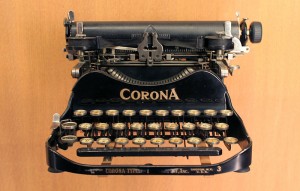
I want my Smith-Corona typewriter back. Just give me the god damned typewriter.
Images:

Prohibition sign, public domain
Corona Portable Typewriter, 1991(1991): Musée des arts et métiers, Coyau, Creative Commons Attribution-Share Alike 3.0 Unported, 2.5 Generic, 2.0 Generic and 1.0 Generic license.

w00t! MacJoy!

Just got back from the Mac store, where The Copyeditor’s Desk, Inc., purchased a fine new capital  expenditure: a brand-new 27-inch 2.7 GH quad-core fancy new iMac! With extra memory thingies added! And a magic trackpad thingie!

Is it or is it not the MOST gorgeous thing?

Ohhh my little business has been needing a new computer for soooo long. I just hate updating hardware and software: if it ain’t busted, why do I have to waste my time fixing it and then learning how the fix works? So I’ve put it off and put it off.

But I’ve delayed as long as I can delay. The decrepit old iMac runs with the speed of a stampeding snail. Worse  yet, it’s so superannuated its operating system can not be updated to the latest large cat Apple is selling. And that means it can’t access iCloud and it can’t do a whole lot of things it needs to be doing in the changing techno-environment.

The S-corporation has actually earned enough, thanks to some improvements in FaM’s ad sales, to afford this gadget. And I think, what with the need for Cloud apps, improved memory and speed, and increasing editorial business, we can justify it comfortably.

Left the little MacBook, which I’ve been using as the business’s main computer for the past several months as the ancient iMac has succumbed to entropy, down at the Apple store to be Lionized and then to be cloned over onto the new machine. Friday I have to spend an hour with Apple’s coaches learning how to use the new software (and you can bet it will take weeks or months to figure it all out). And then it comes home!

Next: a new printer/scanner. Maybe a laser printer, hm?

🙂