Coffee heat rising

Budgeting Time for a Better Life

I am getting so flicking fat! Since I got sick three months ago, I’ve put on six or seven pounds, an unheard-of thickening. Was already overweight, so an extra slug of poundage really does put me in the “fat” category.

Why? Well, besides the fact that for about a week or ten days all I could gag down was ice cream.

As a practical matter, I’ve gone on ice-cream binges before and never gained an ounce. IMHO, the why behind this predicament is bone-laziness, loafing in front of the computer all day long. I mean, really: how long does it take to write a blog post? An hour, at the outside? Two blog posts a day should take one a couple hours, maybe three at the outside. Yet I seem to spend so much time at my desk that I don’t clean house, I don’t get any exercise, I don’t take care of the yard, and I often don’t bother to fix a decent meal for myself. No wonder I’m turning into a barrel of lard.

Woke up at 4:00 this morning wondering what on earth I do with all my time and why on earth I can’t seem to get off my duff long enough to waddle around the block with the dog. After all, I’m normally up by 5:00 a.m. and go to bed around 9:00 p.m. That’s 16 hours of consciousness a day, seven days a week: 112 potentially useful hours a week.

In 112 hours, I can’t find time to get a few minutes of exercise? I can’t dust the furniture or scrub the floors? WTF???

So, if I were to add up all the things I routinely need to do, how much of that 112 hours would they really absorb?
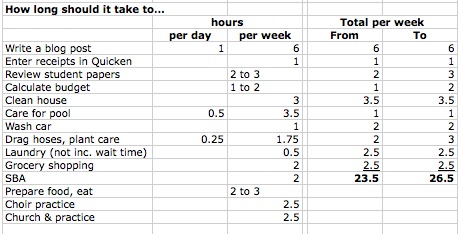
Hmm… So, about 20 to 30  hours a week are occupied in productive activities. Add in class time and driving time, about 8 hours a week, and we still aren’t occupying all of 40 hours. Out of 112 available hours.

Well, then: what AM i doing to waste the remaining 74 to 84 hours a week?

• Playing Mahjong and other computer games
• Reading news on the Net
• Surfing and commenting on websites (I probably spend as much time writing at other people’s sites as I do on my own)
• Surfing the Web
• Eating
• Driving around

That is a lot of time to kill diddling around with a computer. And what am I neglecting while wasting all this time?

Health: not exercising, not eating well

Could be doing:

• Walking, biking, hiking
• Cooking and storing healthy meals

Social life

Could be doing:

• Inviting friends over
• Socalizing
• Volunteering

Cleanliness

Could be doing:

• Cleaning house at least once a week
• Cleaning car
• Cleaning garage
• Taking better care of self and appearance
• Keeping windows, window coverings, fans, & lights clean

Writing e-books

Could be doing:

• Scheduling specific periods to compile e-books

• Marketing business

Could be doing:

• Joining groups, making presentations
• Working marketing campaigns

Huh! So, what should I, could I do that I’m not doing now? Not on a regular basis, or not in any organized way?

Bookkeeping: 1-2 hours/week
Exercise: 1-2 hours/day: 7-14 hours/week
Clean house: 2-3 hours/week
Blog: limit to 2 hours/day, 6 days/week: 12 hours/week
Teaching: 8 hours/week
Yard care: ca. 30 min./day: 3.5 hours/week
Shopping: about 2-3 hours/week
SBA/PPP: 3 hours/week (+ driving time)
Read news: limit to 1 hour/day: 7 hours/week
Market business: 10-20 hours/week
Learn real estate: ca. 3 hours/week over next 7 weeks
Cooking: 1.5 hours/day: 10.5 hours/week

How would this shake out, if I could actually organize my time to comprise all these activities on a regular basis?
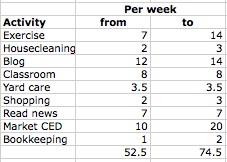
This would occupy 53 to 75 hours a week of the 112 hours during which I’m awake and reasonably conscious. And that would leave 37 to 59 hours a week to loaf. And get in 7 to 14 hours a day of exercise!

{Sigh} I need to get organized. I need to spend as much time and thought on budgeting my time as I do on budgeting my money!

Money Update: Lookin’…not so bad

Hallelujah! For the first time all winter (and..hmmm…as I recall, all last fall and summer), I came out in the black this month. The AMEX bill came in at only $844!!!! That is incredible, since it covers all nonessential spending (food, gasoline, clothing, dog, garden, pool, household goods, eating out, doodads, kitsch, hoodoos, and whatnot). That’s an $1100 budget, which I’ve overspent every month since my limited memory runneth not to the contrary, as unexpected gouge after surprise expense after inexcusable indulgence has tumbled down on the bank account.

The reason for this little triumph, of course, is that for the past two months I’ve been too sick to crawl out of the house. That means I’ve stayed away from Costco.

Ah yes. Costco. A giant drain into which to pour dollars.

Haven’t bought meat in over a month, except for a couple packages of cheap chicken thighs for the dog. The gigantic haul of produce from Market on the Move, once it was cooked up into various scrumptuosities, has filled the freezer. Except for one Costco run early in the budget cycle (it is my favorite purveyor of wine and lifetime supplies of cheese), almost all this month’s groceries came from Safeway and the ethnic market on the corner.

That may be the secret to staying on budget (other than “don’t let your car break down” and “evade all encounters with doctors”): stay away from Costco. Or more to the point, stay out of stores in general.

A little over $4400 came in from the state for the last payment owed for unused sick-leave time. That brings the “survival” pool back up to where it was at the beginning of the summer. That should stretch the survival fund’s lifetime about another year, by which time I’d better have a real job or I’ll have to start drawing down retirement savings to put food on the table. Unless I get a tax refund (which, with $8000 worth of deductible medical expenses, I probably will), the survival fund will run out about this time next year, maybe sooner. Taxes and utilities have risen high enough that what I earn no longer suffices to make ends meet, and so I’m having to pull down more from survival savings than I net on teaching.

Anyway. Tomorrow’s another day…I’ll worry about it when it gets here. For the nonce, things are pretty calm.

Moments of Fame:

The Carnival of Financial Camaraderie is up at My University Money, whose proprietor kindly included Funny’s squib on the cost-effectiveness of a AAA membership.

This week’s Carnival of Personal Finance, hosted at Well-Heeled Blog, included FaM’s rumination on the (rather few) advantages of hanging on to financial records forever and a day.

w00t! The Lion Roars!

Well, despite my recent grousing, the new iMac just paid for itself. Matter of fact, it may have paid for itself in spades.

The colleges where I freelance…uhm, work as an adjunct “employee” use a course management program called Blackboard. This widely loathed suite of educational software worked pretty well in its callow youth, but now that it’s reached middle age it is decidedly top-heavy. And it’s renowned among faculty and students alike for its time-consuming, circular, and chronically frustrating quirks.

Among its many curiosities, it won’t let you upload a lecture-length lecture. Video communications with students, we’re told, need to be limited to three or four minutes.

That’s practical: you, too, can create 10 or 15 separate videos to upload a 40-minute lecture. What else do you have to do with your time, eh?

Found a workaround. Discovered it would work only in one semester’s shell, so that each lecture had to be redone or, equally time-consuming, manually moved every freaking semester.

What else to I have to do with my time, eh?

Rebuilt my lectures as PowerPoints with audio. Blackboard wouldn’t upload them. Audio took up too much space.

Rebuilt the PowerPoints as silent presentations, typing transcripts of spoken passages. What else do I have to do with my time, eh?

Blackboard wouldn’t upload them, either.

Broke the PowerPoints into tiny little pieces and deleted as many images as possible. What else do I have to do with my time, eh?

Blackboard wouldn’t upload ANY PowerPoint files. Period. It won’t upload PowerPoint presentations.

Converted all the PowerPoints into PDFs. Not as time-consuming as some of the other antics, but still…

So this all took the wind out of my sails, when it came to creating and presenting the online magazine writing course that’s supposed to be such a little showpiece.

I tried creating a video and posting it to YouTube, but with the antique iMac and the aged software, one had to jump through hoop after complicated hoop after ever-more complicated hoop to get a video file online. And you know what? I do have better things to do with my time!

Months pass. Eventually I get around to purchasing the present brand-new iMac, and the Apple Geniuses clone the cute little MacBook Pro onto the new spectacular contraption.

This morning while I’m playing with it, I notice an old video file on the desktop, where I’d saved it to the MacBook during the failed attempt to post it to YouTube. It opened in QuickTime, and lo! QuickTime now has all sorts of interesting things you can do with a file.

Among these are the options to save the file in a Web-compatible format and to post it to YouTube, Vimeo, or several other platforms.

Like, just one click and it will go up on YouTube?

Really?

Yesh. Really.

Couldn’t believe it!! As we scribble, we’re uploading my second attempt at stardom, a discussion of how writers use a magazine’s table of contents to gather crucial marketing information. The first one, on the uses of a masthead, is already up on YouTube and embedded in the course Website!

Well. This not only will supercharge my online course, it will give me a very nice example to wave around during the upcoming interview for a full-time job. It will show that I know how to use the Internet for pedagogical purposes. With a vengeance.

Mwa ha ha!

I still believe I’ve got a snowball’s chance in a crematorium of getting hired. I mean really: would you hire someone into a plum job if that someone was already collecting Social Security? No. Of course not.

Still. Nothing ventured, nothing gained. Or, to coin yet another phrase, anything’s possible. I guess.

If a miracle happens and I get this job, and I start at about what I was earning at GDU…well. Let’s see…I paid $2,200 for the computer. Should the college hire me, under the influence of the spectacular videos I just posted for its students, that computer will have paid for itself 22.3 times over.

🙂


Apple iCloud: iFog?

Well, hoping that maybe a day of rest and reconsideration would clarify the mysteries of the new Macintosh OS and its wondrous new iCloud. Instead, it’s just brought on more iFog.

Yesterday two different One-on-One tutors at the Apple store led me to believe that you could transmit your photos, which are collected curiously as “events” over which you have little organizational control in a program called iPhoto, to iCloud. Apple’s answer to cloud computing, iCloud supposedly allows you to “sync” your devices. I specifically asked if I understood correctly: that if I organized my photos in X manner on, say, the iMac, they would show up the same way on the iPad and the MacBook Pro. Yes, I was told; and if I add a photo to iPhoto on the MacBook or snap a picture with the iPad’s camera, it will be visible on the other two devices.

Well. Not even remotely what I thought I was getting, but kind of kewl.

So it would seem. Not.

Today I wasted the entire day organizing photos in the Mac’s infuriatingly illogical iPhoto system (which gives you “events” that correspond roughly with analog film rolls and which can be manipulated, added to, subtracted from, and renamed, but which can NOT be made to appear in any order that makes logical sense to the human mind except through time-consuming, painstaking manual dragging and dropping. Tested the theory that this activity would be reflected in iCloud, which is connected and operating with all three devices, and hence on the other two gadgets.

No. It is not true that any such “sync” occurs. Nor does it appear that this is just little me: far more hard-core Apple Fanpersons express similar frustration.

Nor is it true that, as Apple states on its Website touting the iCloud’s features, “you can access your mail, contacts, calendar, and documents — ad-free — from any computer at icloud.com.” This is false because you cannot back up documents to iCloud unless they were produced in an Apple program. Most of us who use our computers for business purposes create and use MS Word and MS Excel documents, Microsoft Office being the lingua franca of the business world.

IMHO, if iCloud has any utility, it’s for Apple hobbyists. For the rest of us, it’s a waste of time and money. What exactly the point is escapes me, when we have services like DropBox that will run seamlessly with iPhoto.

As for the documents that iCloud refuses to store, I’m signing up for Carbonite. If we’re going to pay for a cloud utility, might as well pay for one that works.

That notwithstanding, it must be said that a shiny new 27-inch iMac is a gorgeous piece of furniture.

😀

MacTimeWasting

Damn, but I hate, hate, HATE having to update hardware and software. It’s so frustrating and it absorbs s-o-o-o-o-o-o damn much time, some of which right this minute I should be using to read a client’s book, and now after having spent two hours schlepping down to the Apple store (in the 8:00 a.m. rush hour, with every wacko who has a driver’s license frolicking grotesquely in front of me!), dinking around with sort of learning how to operate Lion (spare me the goddamn cutesy names, dear Apple, and please spare me the interminably repeated interminable learning curves!), getting connected with the iCloud, learning that it’s not as advertised, and discovering the Geniuses hadn’t done half the stuff that I asked them to do and that they said that they would do while they’ve had my MacBook for the past two and a half days, NOW I HAVE TO SCHLEP BACK DOWN THERE THIS AFTERNOON!

It’s after 11, and so effectively the entire morning is blown. Starting at 12:30, when I’ll have to get back on the road again, the entire afternoon will no doubt be blown.

When I dropped $2200 on the current new iMac, Apple agreed to…

• clone the applications and files on the MacBook to the new unit;
• update the MacBook’s operating system to Apple’s latest large cat, “Lion”; and
• connect the two computers to iCloud.

After two days without an efficiently functioning computer, I fly into the store at the appointed time and learn that yes, they have cloned the MacBook to the gigantic new iMac. And…

• No, they have not updated the MacBook’s OS. And
• Yes, I can expect downloading and installing Lion to take something around two hours from my office’s connection. But
• Sure, they’ll download it on their hyper-fast connection; it’ll take around 20 minutes there. And
• No, I don’t really want to wait for it to install at the store, because that will take upwards of an hour. Do I have something else to do in the (closed, at that hour) mall? And
• No, they haven’t connected either computer to iCloud. And
• No, come to think of it, you can’t use iCloud to store files. Well, unless they’re files created in Mac programs. iCloud will not let you store MS Office files! Hmmmm…
• No, we don’t know why you’re paying for this service. But you have to buy it to use your MacMail.
• Yeah, just about iCloud’s only function is to synch devices. Isn’t it kewl how you can get all three of your toys to talk to each other through this thing? Look, look! They’re all the same now!
• Yes, the only way you can locate a missing iPad is to have its GPS device configured so any moderately clever one who choses can trace your every footstep. But of course,
• No, you can’t use the “find my iPad” function without letting any-moderatelyclever-one snoop into your personal life. Isn’t it odd, though, that you would object to that?

When I left the MacBook Pro there to undergo these procedures, I said in no uncertain terms, please do NOT disable my Acrobat Professional! Please, please, PLEASE be sure this goes over to the new computer with no problem. I use this program in my work. It is crucial. It must function for me to do my job.

N-o-o-o-o-o-o-o problem, said they.

So after I bring the MacBook home and let it grind away for an hour gagging down the current jungle cat, I turn it on and what do I find?

A nice big circle with a line through it slapped over the Acrobat Professional icon.

Phone Apple store. Wait interminably listening to goddamn rap music (can you believe rap has now descended to the level of elevator muzak?), interrupted periodically with a robot voice cooing, “Your call is next!”

Get a very youthful male voice on the phone.

“When I brought this thing in to be cloned and updated,” say I, “I explained that I really do need Acrobat Professional, because it’s something I use in my work all the time. I asked your staff not to disable it, no matter what. Now I get ‘You can’t open the application because PowerPC applications are no longer supported.’ So, WTF????? What am I supposed to do now?”

“Uhmmm….  Well, that’s a really good question!”

“Isn’t it?”

[Personally, I’ve already figured out the problem is Mac won’t support Flash applications and so it probably won’t run Acrobat at all, period. At best, there’s a passel of “known issues,” fixes to which are problematic at best. To say I’m pissed is to understate dramatically.]

[I know there are workarounds in the new  Preview, yes, yes, she said. She knows that. But they’re not the same, and they don’t do I what I need the goddamn program to do.]

The iMac is still in its box, it being too heavy for me to lift onto the desk by myself. God only knows what hassles installing that and trying to get it to talk to my dinosaur of an HP all-in-one will entail. You can bet, though, that at least one of those hassles will involve my having to stuff it back into the box and lug it back down the the Apple store.

Never fails.

I want my Smith-Corona typewriter back. Just give me the god damned typewriter.

Images:

Prohibition sign, public domain
Corona Portable Typewriter, 1991(1991): Musée des arts et métiers, Coyau, Creative Commons Attribution-Share Alike 3.0 Unported, 2.5 Generic, 2.0 Generic and 1.0 Generic license.

Charley’s New Sport: Counter-surfing!

Prince Charles recently discovered that he’s now tall enough to surf counters. Not only can he reach the top of a counter easily, with little effort he can grab things that are set way back from the edge. He also noticed desirable things often reside atop the dinner table.

This is what the Human calls “not a good development.” We might even say I hate that!

Loud exclamations of No! Bad dawg!! QUIT THAT!!! only add to the fun. A squirt in the face with cold water gets the dog’s attention…very, very briefly. Food trumps face-squirt, any day.

Luckily, the Human is not without resources. From deep in an old, dusty drawer came a tool I once used to get Anna the German Shepherd to stay off her favorite perch, a white sofa. It’s called a ScatMat, and it’s a strip of plastic-encased wiring that emits a mild shock—feels like that jolt of static electricity you get when you touch a doorknob after schlepping around on wool rugs. Here’s one available at Amazon: it’s longer than the ones I have, and I know I didn’t pay $60 for it, and so if you’re interested, you may want to check your local pet store or, if Skimlinks puts up a live link to that first mention, see if you can get one cheaper there. They come in different sizes and shapes—you can get them in rectangular shapes, for example, that might be used to guard an entire chair or block the dog from a floor or entry to a room.

These ScatMat things are awesome. They really work, and they don’t hurt the dog. No whapping with newspapers, no hollering, and best of all, no sandwiches or donuts carried off between canine jaws. They’re most effective when you catch the dog in the act and emit a firm “NO!” just as he’s raring up to explore the countertop. But because the mat is always on, it will deal out a reminder even when you’re not in the room.

Another device that I’ve used with mixed results is a shrill motion-sensitive alarm that squeals when the dog (or cat, or anything) touches the sacred piece of furniture. For the Ger-shep, I bought both the Scraminal and the Tattle Tale. They’re OK, I guess: they  make an annoying noise that’s probably more aversive for the human than it is for the dog, and I found they weren’t as effective at short-circuiting the counter-surfing and furniture-jumping as an electrified strip. To make these things work, you need to have already conveyed to the dog that jumping up on the furniture or counters is unacceptable. Otherwise, the animal doesn’t perceive the noise as a signal to quit doing that.

 * * *

Holy God! Somebody just tried to open the front door and Charley went BATSHIT CRAZY!

Hey, pal. You’re a freaking golden retriever,  not a pit bull.

He started the alarm and then Cassie went off, too. As I went trotting into the living room, I could hear someone messing with the outside security door…and OMG, the inside door was unlocked!

Flipped the deadbolt shut, grabbed the shilelagh that resides next to the door, and ran for the phone. By the time the 911 operator answered, they’d wandered into view of the front window: a couple of middle-aged women, neither of whom looked very bright.

Probably religious nuts or political canvassers, though they didn’t leave any propaganda at the door. Usually the fruitcakes will leave a Watchtower or some similar litter on your doorstep, and political shills will drop brochures or fliers.

Annoying. And stupid! To get to the security door, they have to go through an iron gate and enter a courtyard, which pretty obviously says “private property.” They probably were trying to open the screen door to knock on the interior door, since the two (!) doorbells (one outside the gate and one next to the front door) are often overlooked by the dim of eyesight or brainpower.

Well. Good dog! It’s amazing that he’ll do that at this young age. And reassuring: Cassie yaps—when she gets up a head of steam, she sounds like an enraged poodle. But when Charley barks, he sounds like something that means business. Honestly, when he gets mature enough to stay at M’hijito’s house all day, I may go out and get another one of that breeder’s dogs. Especially if she ever wants to get rid of one that’s grown and trained.