Coffee heat rising

Thank You, Amazon Reviewers! $$$$$

Reading the comments by reviewers on Amazon can save you a bundle. I’ve learned to look up products that I intend to buy locally just to see what Amazon’s reviewers have to say about them.

Case in point: I took it into my fuzzy little head to purchase a slow cooker with a nonstick surface. Whenever I cook the dogs’ chicken or pork, which I do in a crockpot because it can sit in the garage (keeping the smell out of the house) and because I don’t have to tend to it, some residue always sticks on the ceramic container. No amount of soaking will loosen the baked-on gunk. I always end up standing over the garage utility sink, scrubbing with scouring powder. And scrubbing. And scrubbing. And scrubbing. Getting it clean is an unpleasant nuisance of a job.

So I figure to order this contraption from Amazon, the path of least resistance. And here’s what I learn from the reviewers:

  • Nonstick coating bubbles up and peels off
  • Contrary to advertised claims, can’t brown foods in it first: nonstick coating will bubble up and peel off
  • Contrary to advertised claims, can’t be put in dishwasher
  • Lightweight, cheaply made, flimsy
  • Cover doesn’t fit
  • Cover doesn’t fit
  • Cover doesn’t fit, dammit!
  • Ew! Nonstick gunk flakes off and ends up in the food!

In amongst all this commentary, up pops a message from a woman who says she also found the new products unsatisfactory and so decided to fend for herself. She had a large Le Creuset doufeu. Le Creuset pans are enameled, and that surface is effectively “nonstick.” They’re very easy to clean. Thought she, Why not? She loaded the thing with the same stuff she’d put in a slow cooker, set it in a 200-degree oven, and went away. A few hours later: voilà! A slow-cooked  meal!
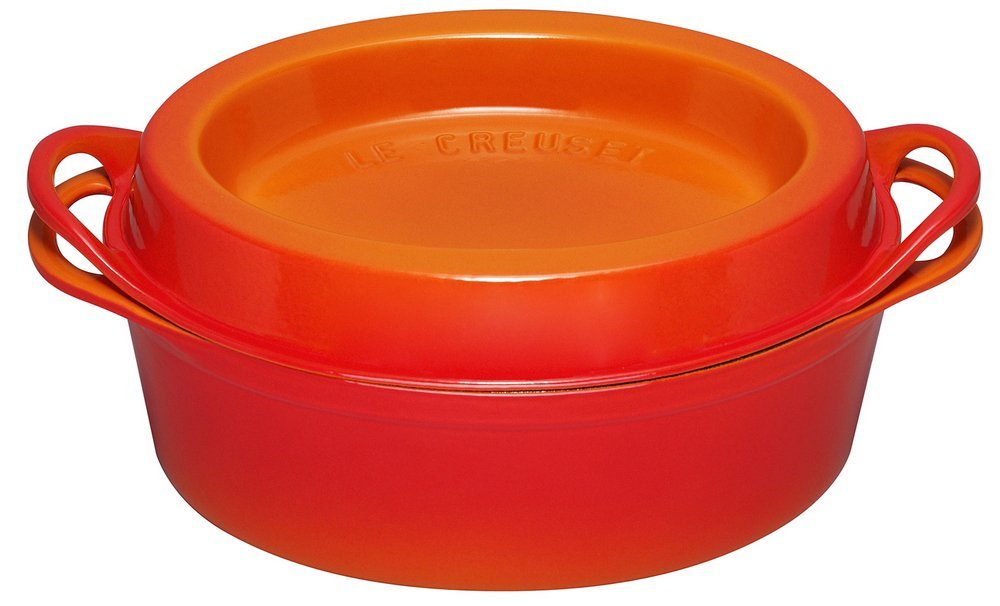
doufeuAhem. A 7¼-quart Le Creuset doufeu will set you back $420. Plus shipping, which you can bet will be hefty for a 7-quart cast-iron pot. A 4½-quart number only costs $300.

That of course doesn’t count the cost of the crane you’ll need to move it in and out of the oven, once it’s fully loaded with food. (You’re supposed to put ice or cold water in the strangely shaped lid, to enhance condensation inside the pot. Alternatively, you can cook other foods, such as potatoes or cornbread, in the lid.)

A crock pot typically holds about 6 quarts. And I need that much volume to cook a giant package of Costco chicken or pork.

Plus a friend who’s a truck driver recently gave me 20 pounds of ground turkey, because the packages were “damaged.” The dispatcher told her to throw it out, but she couldn’t stand that. We took most of it over to the local food bank, but I held back two 10-pound rolls of the stuff for the dogs.

As I thought about the commenter’s idea, it occurred to me that I must have something like that, somewhere in the house or the garage.

And yea verily! What should I find but two huge stainless-steel, copper-bottomed stew pots! Vast! The one I pulled out of the back of a cabinet holds 6 quarts.

Loaded 5 pounds of meat into the thing and set the oven for 300 degrees. I normally set the slow-cooker on “high,” which will cook most potsful of meat in three or four hours. So I figured 300 would be better than 200.

Actually, if anything it was too fast: in three hours, I’d say the meat was a little overcooked. Next time I’ll set it on 200, which should slow the process into the crockpot realm.

Once the ground turkey was cooked, there was plenty of room to add some oatmeal, which cooked in 20 minutes atop a burner, and then the food-processed mixed veggies. Let it cool, packed it into containers, and a week’s worth of fresh dog food was in the fridge and freezer.

Yes, stuff stuck to the sides, same as it does in the crockpot. But this was easy to clean off. You can put a stainless-steel pan on a stove burner. So all I had to do was fill it with water, toss in a handful of banking soda, and let it simmer for awhile. After that, any leftover gunk washed right off in a minute or two: no overnight soaking, no pan in the way when I want to run the clothes washer, and no endless scouring!

I wouldn’t have thought of this (rather obvious!) solution if I hadn’t taken time to read Amazon’s customer comments.

If I had read the reviews of the Samsung clothes washer that drives me nuts, I wouldn’t have bought it. That was when I learned to read Amazon reviews before buying anything, locally or online.

It’s a good idea to start with the three-star reviews, because those are the ones that are most likely to be objective. Five-star raves are likely to have at least some paid posts among them. And, as it develops, one-star rants are often posted by competitors who are trying to tear down the seller’s product. Most people who post three-star reviews will give the product’s pro’s and cons, and some will allude to problems described in worse reviews, either agreeing that they exist or explaining what the complainer did wrong to get a negative outcome.

I’ll usually read three-star reviews first, then go to the one-star reviews. If I’m not put off the product after that, then I’ll look at five- and four-star reviews. If there’s a “Questions Answered” section, be sure to read those, too.

These days, I read them for things I intend to buy here in town as well as things I order online. It’s almost as good as Consumer Reports!

204% Interest? Only in Arizona…

Lest you doubt me when I repeat, for the thousandth time, that our state’s honored legislators are craven lunatics, get this: the Arizona House has approved a bill allowing greedy lenders to charge 204% on consumer loans! Why? Ohhh, well…gee whiz, there’s just no other way a person can get fast cash. Is there?

Then we have this:

Maricopa County is as large as Los Angeles County. It’s the sixth-largest city in the nation. And now we have exactly 60 polling places in the whole damn county! Down from 200, thanks to our craven legislature.

The right-wing state legislators have been working for years to disenfranchise people who might vote Democratic. They’ve gerrymandered districts. They’ve moved voting places into areas where no one in their right mind would unlock the car door, much less get out and dodge bullets. They’ve engaged in active campaigns to disallow large numbers of mail-in ballots. They’ve worked to install complicated voter IDs to force you to prove you’re who you say you are — and no, a voter registration card won’t make it. By changing the name of this election from a “primary” to a “presidential preference” election, they’ve disenfranchised every registered independent voter. Previously, independents could vote for any candidate. Now if you’re a registered independent, you can’t vote at all!

They have tried strategies to disqualify…

• The elderly
• Students
• Disabled people (this year it’s a felony to take your disabled mother’s early ballot to the post office!)
• Military members
• Anybody who even vaguely looks Hispanic
• The working poor
• Naturalized citizens
• Transient citizens
• Residents of more affluent, educated districts who tend to vote Democratic

And now, they’ve closed the polling places. Lines are already upwards of an hour long. The point being, of course, that Democratic voters are likely to have blue-collar jobs or low-level office jobs, the kind of work where you’re not allowed to be late. Or where your pay will be docked if you’re late, no excuses.

I find it astonishing that Americans seem unable to recognize when they’re being lied to and unable to recognize maneuvers designed to rig elections in favor of a specific group.

You know, people who do this kind of thing turn into tyrants when they get into office. If people of good will don’t fight back, America as a democratic republic is essentially doomed.

Oh hell. Maybe it’s already doomed.

I can sing “O Canada.” Will that help me get permanent residency status?

Giveaway of the Week!

Hey, the redoubtable Donna Freedman is GIVING AWAY a copy of her course on writing winning blog posts! That’s a $147 value. And really, the full price is a give-away of sorts: Donna has been a journalist for a lot of years, and she’s one of the most engaging writers in online personal-finance circles. You’ve seen her posts at MSN Money, Money Talks News, Get Rich Slowly, Wise Bread…and of course at her own site, Surviving and Thriving. It’s a 12-part course designed to help you make your writing great, and you also get coaching advice from now until the end of time.

Add a comment to Donna’s post for a chance to win. Deadline to enter is 7 p.m. Tuesday, March 22.

The Carnival Comes to Town

All the Presidential candidates have descended on Arizona, anticipatory to the local primary. It’s quite a circus…especially with the Republican clowns in evidence.

Cruz was down at the border pandering to hatred of Mexicans and Indians. He hasn’t a clue to the real issues: only to the mentality of people who would vote for him.

The local right-wing crazies optimistically compare Trump with the craven Sheriff Joe Arpaio and suggest the similarity between the two opportunists’ political strategies points the way to the White House for Trump.

Meanwhile, Clinton campaigns at a high school in the decrepit low-SES district of South Phoenix (not to say “ghetto”), presumably hoping to get out the vote among the poor and to demonstrate her progressive creds among those who understand that the American middle class is going, going, almost gone.

Sanders is in Tucson, where a substantial educated, enlightened population has grown up around the University of Arizona, the state’s only reasonably decent institution of higher education. That would be, he no doubt figures, where his constituency clusters here in our backward fly-over state.

And Trump? He’s taken over the city’s huge convention center, where protesters started marching at dawn.

Meanwhile, no one seems to notice that our honored legislators are busy trying to draw a line around women’s right to decide what they will do with their bodies, that Arizona is distinguished by ranking at the top of the list for states whose college graduates move away (why might that be??), that the nitwit-infested legislature has defunded the largest community college system in the country (we need a lot of junior colleges because most of our high-school graduates are not well prepared for four-year universities), that the City of Phoenix is about to jack up property taxes in the face of a budget surplus, that utility companies are trying to raise their rates even higher while they work to quash rooftop solar power — this, in a state where  electric bills are already among the highest in the nation — and the city’s wi-fi service is so. freaking. slow….that it’s taken almost 45 minutes to get into just these few links to write just these few words.

WhatEVER. My plan is to walk the dogs while it’s still cool enough and then  stay out of the car and off the roads for the rest of the day.


Work, non diminuendo

So after the day before yesterday’s MS Word fiasco, which as of yesterday morning I thought would be relatively easy to clean up, I spent the entire day wrestling with the damn file!!!!

Copying the 325 pages out of the corrupted file and pasting it into an identical Wyrd template caused the copy to lose its styling. The format looked right: 20 point Alegreya bold level 2 heading, 0 points before, 30 points after…but Wyrd would not read it so! Word, in effect, could not “see” the styles for chapter headings, paragraphs, font format, etc.

It converted all the small-caps first-graf leaders into all caps. Normally you can search > format > all caps and replace with format > small caps. But in this file, Wyrd would not do that. Because, as it developed, the program “thought” the all-caps were small-caps. So I had to go through the entire file, paragraph by paragraph, and manually change every set of all caps to small caps.  This took hours of mindless pointing and clicking and pointing and clicking and pointing and…. God DAMN but I hate it that Apple negated all of Word’s keyboard commands!!!!

The “format paintbrush” didn’t work for the purpose. So, no. There was no way out of the endless point-and-click torture.

Lines wrapped slightly differently in the new file, so I had to go through the entire document again (each of these stages happens one at a time) to fix a whole new raft of widows, orphans, and loose lines. Hours of farting around.

And of course, because rewrapped lines changed the pagination, I had to go through the entire document and replace every page break (each of which was placed where it worked) with a section break/odd page, with baleful ramifications.

Changing the page breaks to section breaks re-fucked up the pagination. So I had to wrestle with the program some more to persuade it to start the roman-numeral pagination on page one, not to put a page number on chapter and section opening pages, and not to give me two roman-numeral sections each starting on page i.

Because Wyrd blocks the view of a blank page after a section break/odd when you’re in View > Print Layout, I can’t get AT the verso side of those pages to hide the running header, so when the damn thing is printed, it will (once again) look like some lady with a typewriter on her kitchen table composed it. I In “Draft,” you can’t see the  headers & footers, so obviously you can’t get into them to fool with covering up the ones you don’t want to print.

T0 fix this, I’ll have to go through every section and change the section breaks to page breaks, fix the headers, and change the page breaks back to section breaks. Then I’ll have to go through all 325 pages, one at a time, and reformat all the sections to the custom format I had to make to create a PDF that tells the printer to print it on 8.5 x 9.5 stock.

Because Wyrd couldn’t read the heading style, it wouldn’t generate a new table of contents. So I had to go through, identify page numbers for every chapter, and create a new TofC. That sounds easy, but it wasn’t, because of the native squirreliness of Word tables. It was, as a matter of fact, an endless effing nightmare.

So I’m not done with a project that should’ve been done a week ago. And I hate Word. I’m beginning to hate Word enough that it just might be worth trying, for the fourth time, to learn how to use InDesign.

No, wait: I see the workaround: Enter a page break before the section break. This will push the section break to the verso side, preserving the section’s formatting. Obscure the running header at the top of the blank page and then delete the page break.

Why should I have to dream up stuff like this? Why should I have to waste my time like this to get what ought to be a simple job done?

Work, Interruptus

Yesterday was incredibly hectic, full of a staggering amount of work, all of which distracted 100% from paying projects. Wow!

Px mountains from iPhoto 2
Click on the image for Bigger & Better…

To start with, though, SDXB showed up here at 9 a.m. to go hiking in the nearby mountain preserve. This seemed OK, because I didn’t yet know how fantastically my little efforts to produce something salable were about to be obstructed. 😀

By the time I got home, the freshly washed and set hair was soaking wet…so there was a job that would have to be done again.

As long as I was already drenched in sweat, I figured I’d better finish the job of cleaning out and refurbishing the storage shed. Started the project several days ago. I knew it would be huge, and it was. By now I’d hauled the junk out, carted a lot to the trash, deconstructed the brick-and-board shelving and reconstituted it in the corner outside (this is all out of sight of the backyard and pool). Found that water had seeped in under the cinderblock supports and corroded the plywood floor Satan had put into the shed.

Why would you put plywood flooring into a construct that sits outside in the rain? Even though he set it on top of some block paving he’d built, of course water is going to seep up out of the ground and get into your finely built floor. What possesses people? Why not use the stuff he build the deck out of: fake wood planks made of some sort of indestructible synthetic? I’ve lived here now for twelve years, perched plants on it, watered them every day throughout the summer, and the thing is as good as it was when I moved in.

Oh well. That was a mess.

So the shed flooring has been drying out for the past couple of days, with all the junk strewn around the yard waiting to be put back.

At Lowe’s, I found some flimsy but serviceable plastic shelving that snaps together like Tinker-Toys — about the limit of my handyperson skills. The bottom-most shelf sits on the ground, but it’s ventilated, and the only part that actually touches the ground is the outside rim of the thing. Air should be able to move through there and allow the plywood to dry out after the next rainstorm. They’re very deep, so they conveniently fit around the rotted spots in the floor.

Meanwhile I used the metal shelving Satan had left behind, which according to Home Depot has a carrying capacity of 250 pounds, to hold the leftover tiles Mike the Tile Dude and Satan himself had left on the floor in there. They groan under the burden, and it remains to be seen whether the weight will eventually break through the weakened plywood floor. If it does, then The Handyman from Heaven can be begged to replace it with something better.

After tapping the big new cheesey plastic shelves together with a rubber mallet, it was time to reload.

The things I actually need — pool gear, mostly — now occupy only a couple of shelves, right in front. The valuable old paint cans, the precious old mortar, the beloved old tile grout: all that went on the metal shelving, pushed all the way to the shed’s back end.

This left plenty of room for the priceless collection of rags to cover plants in wintertime.

Yeah. I’ve now got two gigantic, deep shelves jammed with old sheets and drape panels, lest Phoenix ever get another hard freeze. This hasn’t happened for the past several years. If we’re to believe the climate prophets, it may never happen again. But…it’s a symptom of my cheapskateness, I suppose: I can’t bring myself to throw out anything I just might need again someday. And they do have another use. Many are already spattered with paint: they make fine drop cloths. Just in case I should ever choose to paint the house again… 🙄

This project and its aftermath — scrubbing out the shop-vac, which ended up with mud inside it — consumed most of my energy.

But day was not done…not by a long shot.

Eventually I sit down in front of the MacBook. Go to switch from some program over to Word, aptly nicknamed Wyrd in these parts.

Word hangs on a file that contains data I need to use all the time. It won’t open, apparently because something in that file is awry.

Force-Quit Wyrd.

Try to reload. Wyrd hangs.

Force-Quit. Hangs.

Look up how to keep OSX from auto-reopening files after a crash. The system is already set that way. Look up how to keep Wyrd from reopening files after a crash. You have to get into Word’s Preferences, which means you have to open the program. The program won’t open.

Now I’m beginning to panic. Are the files I’ve been laboring over saved to Time Machine? Check external hard drive: the goddamn thing has somehow disconnected itself! Even though the cable is tightly connected and seems to be operative.

In a word, f-u-c-k.

Get into the iMac. The suspect file, which resides on DropBox, is functional there. Apparently the problem is not a corrupt Wyrd file.

Having force-quit Wyrd yet again, I now manually closed all the rest of the open programs, shut down the computer, and let it sit for a few minutes.

When the computer rebooted, Wyrd loaded normally.

All of which is to say, I suppose, that any file that’s under construction at any given time should be on DropBox, where Time Machine on the iMac will back it up…just in case the MacBook’s external drive mysteriously disconnects itself.

Just LOVELY.

Ah. But that was but the beginning.

The Wyrd file for the book I’ve been working on for the past several days has developed a strange little quirk: on every recto (odd-numbered) page, a little symbol that looks like a dwarfed, compressed paragraph (hard return) mark appears in the upper left-hand corner. The first two lines of copy wrap around this thing, creating an indent.

Weird code 3The book can’t go to print with the first two lines of every other page indented about 1/8 of an inch.

I did not put this character there. I cannot make it go away. It will not delete. There seems to be no way to insert such a thing and no way to get rid of such a thing. A search of the Web with several keyword strings brings up two (2) references to the issue, with no explanation as to what it is and, most to the point, no clue as to how to get rid of it.

Friedman’s Word guru suggests it indicates an anchored image or object in the line above it. I think not: there are no objects or images in the text.

I have done a phenomenal amount of work on this damn thing, and it now appears that if it is to be prepared for print, I’m going to have to type all 325 pages over, from beginning to end!

Along about 10 p.m. last night, it dawned on me that if Wyrd can’t highlight the thing, Word probably can’t copy the thing. So I created a new file in the desired template, highlighted a copied a chapter, and pasted it into the new template.

Hallelujah! It worked.

After a fashion.

This strategy lost a lot of the formatting I spent hours fixing: now I have to go through the whole damn thing and fix a whole new raft of widows, orphans, and loose lines. The small cap formatting reverted to all caps or lc/roman, only Word doesn’t recognize that. Where in the other file I could search all caps and replace with small caps, in this file it thinks the all caps are small caps. So I have to plod through 302 pages again and reapply the small-caps style. The pagination all has to be readjusted to  make chapters appear on recto pages. Running headers/footers have to be redone. Word can no longer read the chapter title styles, so EVERY CHAPTER TITLE has to be restyled!

To wit: most of the three days’ worth of mind-numbing work I did on this thing now has to be done all over again. And then some. But at least I don’t have to retype it from beginning to end. I guess.

I. hate. Word.